Split the Bill Calculator
Enter the total, pick a tip, and choose how many people — SplitVibe splits it evenly in seconds. Everyone ordered differently? Split by item instead.
Split a restaurant bill in three taps
No mental math, no spreadsheet — scan, assign, done.
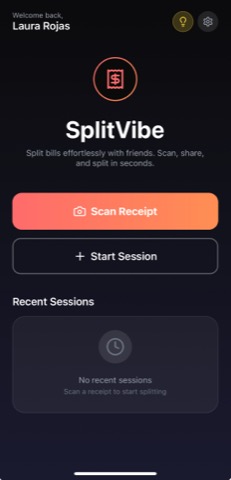
Scan the receipt
Snap the receipt and SplitVibe reads every line item automatically.
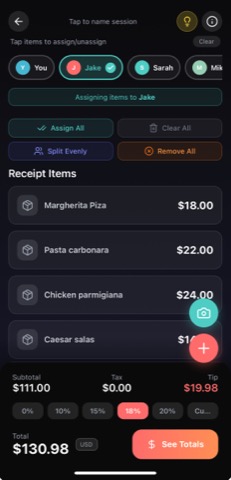
Assign by item
Tap each item to whoever ordered it — or split a shared plate between people.
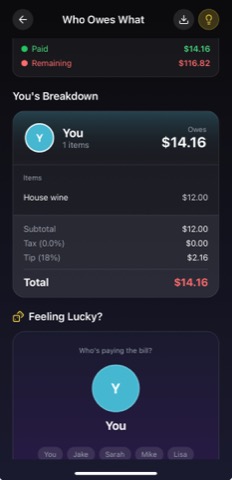
See who owes what
Tax and tip split fairly. Everyone sees the same breakdown, down to the cent.
How to split a restaurant bill
The fastest way to split evenly: take the bill total, add the tip (18–20% is standard in the US), and divide by the number of people. The calculator above does exactly that — including the tip — so no one has to do mental math at the table.
But splitting evenly isn't always fair. If one person had a three-course meal and another just had a salad, an even split means the light eater overpays. That's where splitting by item comes in — and doing it by hand is exactly the tedious part SplitVibe removes.
Split by item — without the receipt math
Instead of typing every line in, scan the receipt with SplitVibe and it reads the items for you. Assign each one to whoever ordered it, split shared plates between several people, and let the app allocate tax and tip proportionally. Everyone sees the same breakdown, and you can share a session code so the whole table has a record.
Split the bill: FAQ
How do you split a bill evenly?
Add up the total including tip, then divide by the number of people. The calculator above does it instantly — enter the bill, choose a tip, and set how many people are splitting.
How much should you tip at a restaurant?
In the US, 18–20% of the pre-tax total is standard for sit-down service. The calculator defaults to 18% and lets you slide it up or down.
How do you split a restaurant bill by item?
Splitting by item is fairer when everyone ordered differently. Rather than typing each line, SplitVibe scans the receipt and lets you assign every item to the person who ordered it, dividing tax and tip proportionally.
Is the split-the-bill calculator free?
Yes — it's completely free with no sign-up. To split by item and scan receipts automatically, download SplitVibe free on iOS and Android.
Split by item, automatically
Scan the receipt instead of typing it. Free on iOS and Android.